04
第 4 章
認証境界としての BFF
この章で学ぶこと
1
トークンハンドラーパターンの仕組みと実装
2
Cookie セッションによるトークン管理
3
トークン中継によるバックエンド API 呼び出し
4
CSRF 攻撃の仕組みと CSRF トークンによる対策
図解
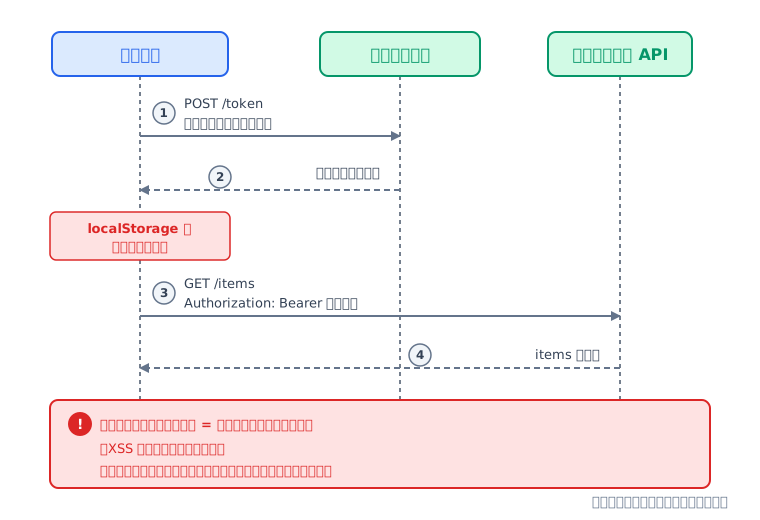
BFF がない場合のトークン管理
BFF がない構成では、アクセストークンをブラウザが直接保持してバックエンド API に送る
トークンの課題
トークンハンドラーパターン
実演: Cookie セッション
コード読解
CSRF 対策
実演: CSRF 対策
まとめ
解説
アクセストークンの保管場所が問題になる理由
XSS によるトークン窃取
localStorage のデータは JavaScript からアクセス可能。XSS 攻撃でトークンを読み取られるリスクがある
トークンの制御権を失う
ブラウザに渡したトークンは、サーバ側から無効化・観測できない
トークンの課題
トークンハンドラーパターン
実演: Cookie セッション
コード読解
CSRF 対策
実演: CSRF 対策
まとめ
解説
XSS によるトークン窃取のリスク
XSS(クロスサイトスクリプティング)
攻撃者が Web ページに悪意ある JavaScript を注入する攻撃
エスケープ処理の不備
ユーザー入力が無害化されずに HTML へ埋め込まれると発生する
トークン窃取
注入されたスクリプトが localStorage のトークンを読み取り、攻撃者のサーバに送信する
トークンの課題
トークンハンドラーパターン
実演: Cookie セッション
コード読解
CSRF 対策
実演: CSRF 対策
まとめ
図解
トークンの制御権を失う問題
ブラウザ側にトークンがあると、サーバ側からトークンを無効化できない。サーバ側にトークンがあれば、
セッションを消すだけで即座に効く
運用で必要になる操作
ブラウザ側にトークンJWT を localStorage 等に保管
サーバ側にトークンBFF のセッションに保管
ログアウト時の即時無効化
できない(有効期限切れまで有効)
できる(セッション削除で即時)
管理者による強制ログアウト
できない
できる
他のデバイスからログアウト
できない
できる(該当セッションのみ削除)
退職者のアカウント停止
停止まで時間差が生じる
即座に反映される
漏洩疑いでの一括無効化
できない
できる(セッション一括削除)
利用状況の観測
誰が使用中か把握できない
セッションから把握できる
トークンの課題
トークンハンドラーパターン
実演: Cookie セッション
コード読解
CSRF 対策
実演: CSRF 対策
まとめ
図解
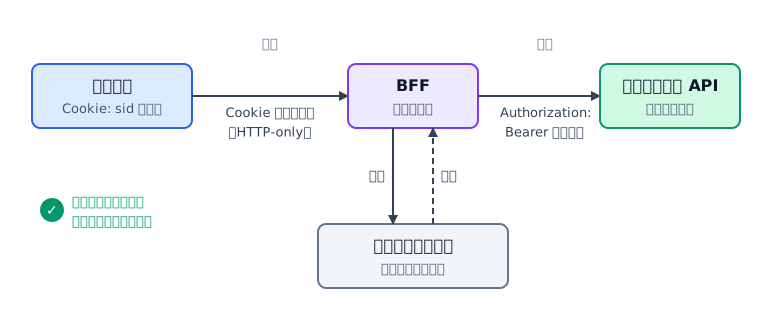
トークンハンドラーをBFFが担う構成
BFF がトークンを保管し、ブラウザには Cookie セッションのみで通信する構成
トークンの課題
トークンハンドラーパターン
実演: Cookie セッション
コード読解
CSRF 対策
実演: CSRF 対策
まとめ
図解
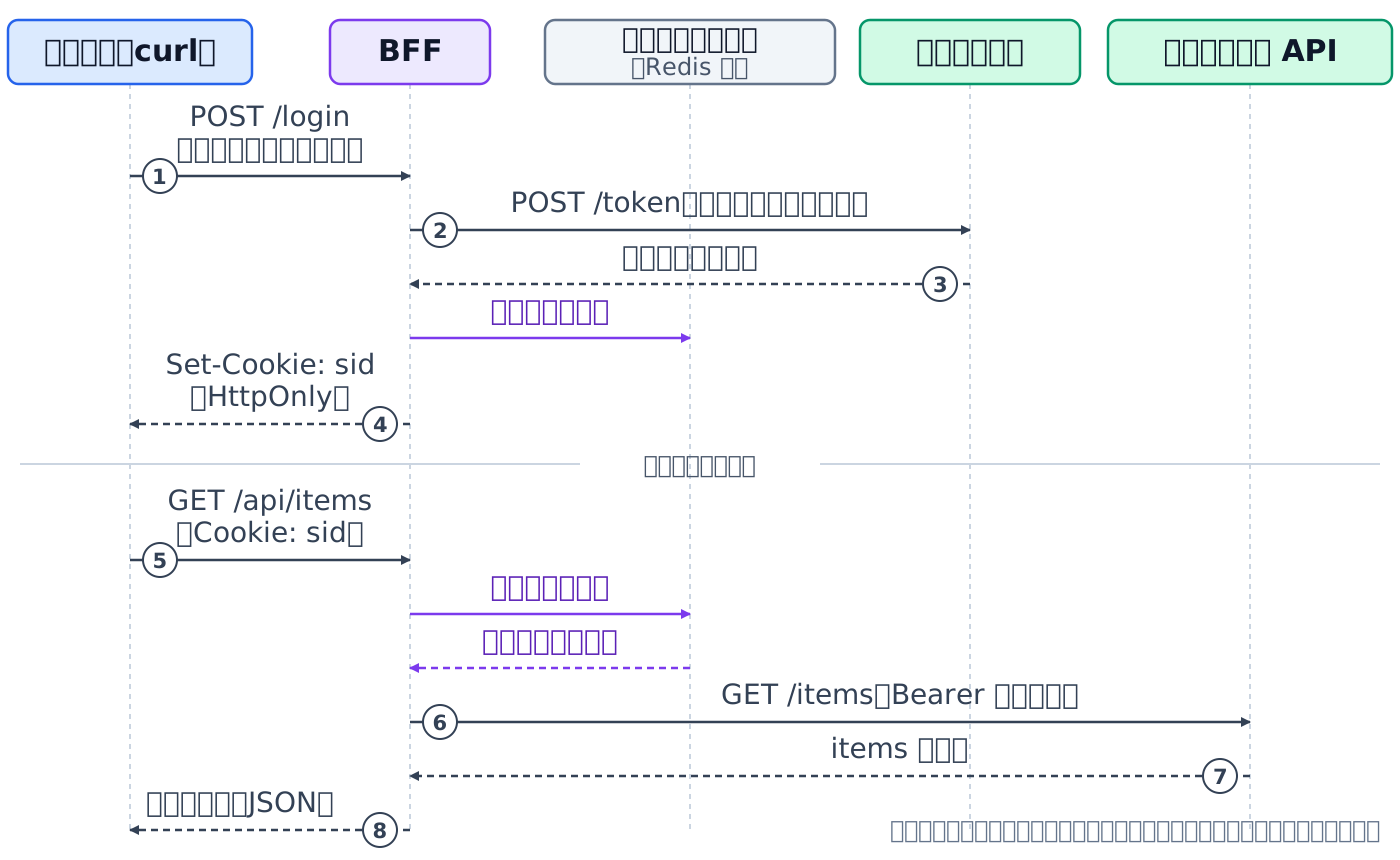
トークンハンドラーパターンのシーケンス
ログインから保護リソース取得までの一連のフロー。トークンは BFF の中だけで流れる
トークンの課題
トークンハンドラーパターン
実演: Cookie セッション
コード読解
CSRF 対策
実演: CSRF 対策
まとめ
解説
Cookie セッションの仕組み(ブラウザと BFF の間)
セッション
サーバがクライアントごとの状態を保持する仕組み。BFF はトークンをセッションに保管する
HTTP-only Cookie
JavaScript の document.cookie から読み取れない Cookie。XSS によるセッション ID の窃取を防ぐ
セッションストア
セッションデータの保管先。本番環境では Redis 等の外部ストアを使い、BFF プロセスの外にトークンを保管する
ブラウザにはセッション ID のみ
アクセストークンはセッションストアに保管される
トークンの課題
トークンハンドラーパターン
実演: Cookie セッション
コード読解
CSRF 対策
実演: CSRF 対策
まとめ
解説
BFF とバックエンド API の間
セッション ID からトークンを取り出す
BFF は Cookie のセッション ID でセッションストアを検索する
取り出したトークンをバックエンドAPIへのリスエストに使用
Authorization ヘッダにBearer <トークン> の形式でバックエンド API にリクエストを送るなど
トークンの課題
トークンハンドラーパターン
実演: Cookie セッション
コード読解
CSRF 対策
実演: CSRF 対策
まとめ
解説
サーバ側トークン管理で得られる制御
即座に無効化できる
セッションストア(Redis 等)からセッションを削除するだけで、そのユーザーのアクセスを即座に遮断できる
運用上の制御ができる
ログアウト・管理者による強制ログアウト・「他のデバイスからログアウト」・退職者のアカウント停止・漏洩疑いでの一括無効化
観測できる
現在アクティブなセッション数、誰がいつアクセスしたかをサーバ側で把握できる
トークンの課題
トークンハンドラーパターン
実演: Cookie セッション
コード読解
CSRF 対策
実演: CSRF 対策
まとめ
図解
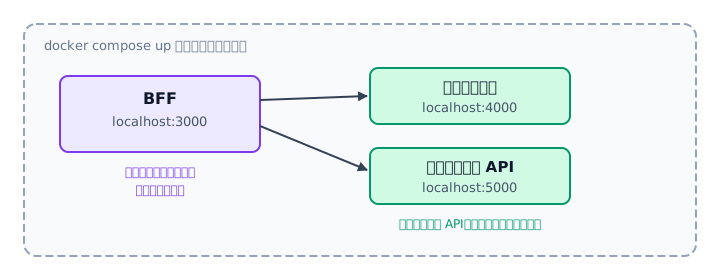
環境起動
docker compose up で起動する 3 つのコンテナ
トークンの課題
トークンハンドラーパターン
実演: Cookie セッション
コード読解
CSRF 対策
実演: CSRF 対策
まとめ
コマンド
docker compose up
実行する
コマンド
コマンド
$ cd ch04-auth-boundary$ docker compose up -d
ch04-auth-boundaryこの章のサンプルコードのディレクトリ
docker compose up -d3 つのコンテナをバックグラウンドで起動
トークンの課題
トークンハンドラーパターン
実演: Cookie セッション
コード読解
CSRF 対策
実演: CSRF 対策
まとめ
実演
トークンの課題
トークンハンドラーパターン
実演: Cookie セッション
コード読解
CSRF 対策
実演: CSRF 対策
まとめ
ログインと Cookie 取得の実演
目的BFF にログインし、HTTP-only Cookie が発行されることを確認する
実行する
コマンド
コマンド
$ curl -i -X POST http://localhost:3000/login -H "Content-Type: application/json" -d @requests/login.json -c cookies.txt※ Windows(PowerShell)では curl を curl.exe に読み替えてください確認する
ポイントSet-Cookie ヘッダに HttpOnly 属性が付いていること / Cookie 名が sid であること
ポイントSet-Cookie ヘッダに HttpOnly 属性が付いていること / Cookie 名が sid であること
実演
Cookie による保護リソース取得の実演
目的Cookie を付けて保護リソースにアクセスし、トークン中継の動作を確認する
実行する
コマンド
コマンド
$ curl http://localhost:3000/api/items -b cookies.txt -c cookies.txt※ Windows(PowerShell)では curl を curl.exe に読み替えてください
確認する
ポイントセッション内のトークンでバックエンド API からデータが取得できること
ポイントセッション内のトークンでバックエンド API からデータが取得できること
トークンの課題
トークンハンドラーパターン
実演: Cookie セッション
コード読解
CSRF 対策
実演: CSRF 対策
まとめ
コード
セッション設定のコード
BFF のセッション設定。Cookie に HttpOnly と SameSite を指定している
トークンの課題
トークンハンドラーパターン
実演: Cookie セッション
コード読解
CSRF 対策
実演: CSRF 対策
まとめ
コード
ログインハンドラのコード
認証サービスからトークンを受け取り、セッションに保管するログイン処理
トークンの課題
トークンハンドラーパターン
実演: Cookie セッション
コード読解
CSRF 対策
実演: CSRF 対策
まとめ
コード
トークン中継のコード
セッションからトークンを取り出し、バックエンド API に Bearer ヘッダで中継する処理
トークンの課題
トークンハンドラーパターン
実演: Cookie セッション
コード読解
CSRF 対策
実演: CSRF 対策
まとめ
図解
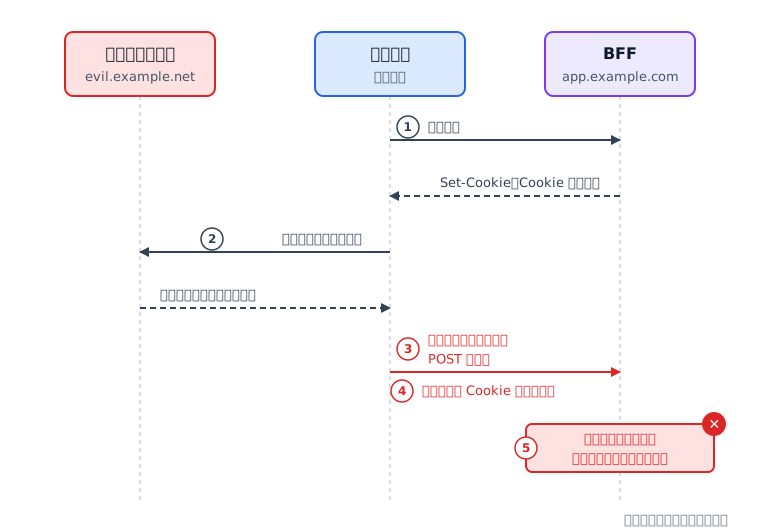
CSRF 攻撃の仕組み
悪意あるサイトが Cookie の自動付与を悪用して偽造リクエストを送信する攻撃
トークンの課題
トークンハンドラーパターン
実演: Cookie セッション
コード読解
CSRF 対策
実演: CSRF 対策
まとめ
解説
Cookie の SameSite 属性
SameSite 属性とは?
Cookie が異なるサイトからのリクエストに付与されるかを制御する属性。
サーバ側が、Cookieの扱いについて指定する。
サーバ側が、Cookieの扱いについて指定する。
設定値
別サイトからの POST
リンク遷移の GET
補足
Strict
付与しない
付与しない
リンクで遷移してもログイン状態が引き継がれない
Lax本章で使用
付与しない
付与する
通常のリンク遷移を保ちつつ POST の CSRF を防ぐ
None
付与する
付与する
CSRF 保護はない。Secure 属性(HTTPS)が必須
トークンの課題
トークンハンドラーパターン
実演: Cookie セッション
コード読解
CSRF 対策
実演: CSRF 対策
まとめ
解説
SameSite=Lax の限界と CSRF トークン
GET リクエストには Cookie が付く
Lax ではリンククリックの GET リクエストに Cookie が付与される
GET で状態変更する API があると突破される
設計ミスで GET に副作用があると、Lax だけでは防げない
CSRF トークン
Cookie に加えて別の検証値を要求し、正規クライアントのみ通過させる追加防御
トークンの課題
トークンハンドラーパターン
実演: Cookie セッション
コード読解
CSRF 対策
実演: CSRF 対策
まとめ
実演
CSRF トークンなしで拒否される実演
目的CSRF トークンなしの POST リクエストが 403 で拒否されることを確認する
実行する
コマンド
コマンド
$ curl -X POST http://localhost:3000/api/items -H "Content-Type: application/json" -d @requests/new-item.json -b cookies.txt -c cookies.txt※ Windows(PowerShell)では curl を curl.exe に読み替えてください
確認する
ポイントCookie は有効だが CSRF トークンがないため 403 が返ること
ポイントCookie は有効だが CSRF トークンがないため 403 が返ること
トークンの課題
トークンハンドラーパターン
実演: Cookie セッション
コード読解
CSRF 対策
実演: CSRF 対策
まとめ
実演
CSRF トークンを付けて成功する実演
目的CSRF トークンを取得し、ヘッダに含めた POST リクエストが成功することを確認する
実行する
コマンド
コマンド
$ curl http://localhost:3000/csrf-token -b cookies.txt -c cookies.txt$ curl -X POST http://localhost:3000/api/items -H "Content-Type: application/json" -H "X-CSRF-Token: {取得した値}" -d @requests/new-item.json -b cookies.txt -c cookies.txt※ Windows(PowerShell)では curl を curl.exe に読み替えてください
確認する
ポイントCookie と CSRF トークンの両方が揃うとリクエストが成功すること
ポイントCookie と CSRF トークンの両方が揃うとリクエストが成功すること
トークンの課題
トークンハンドラーパターン
実演: Cookie セッション
コード読解
CSRF 対策
実演: CSRF 対策
まとめ
コード
CSRF ミドルウェアのコード
CSRF トークンの生成と検証。セッション内のトークンとリクエストヘッダの値を照合する
トークンの課題
トークンハンドラーパターン
実演: Cookie セッション
コード読解
CSRF 対策
実演: CSRF 対策
まとめ
図解
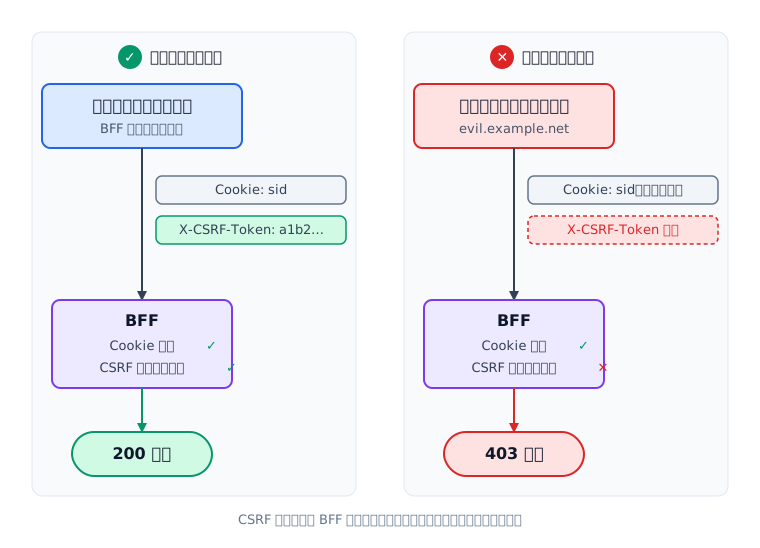
正規リクエストと攻撃リクエストの対比
Cookie だけでは認証が完了せず、CSRF トークンが追加の防御層として機能する
トークンの課題
トークンハンドラーパターン
実演: Cookie セッション
コード読解
CSRF 対策
実演: CSRF 対策
まとめ
まとめ
この章のまとめ
✓トークンハンドラーパターンは、BFF がトークンをサーバ側で管理し、ブラウザとは Cookie セッションのみで通信する構成である
✓HTTP-only Cookie により、XSS でもセッション ID を JavaScript から読み取れない
✓サーバ側にトークンがあるため、ログアウト・強制ログアウト・一括無効化が即座にできる
✓トークン中継により、BFF がセッションからトークンを取り出してバックエンド API に Bearer ヘッダで付与する
✓CSRF 攻撃は Cookie の自動付与を悪用する。CSRF トークンで正規クライアントのみ通過させる
次章: エラーハンドリングと縮退設計
トークンの課題
トークンハンドラーパターン
実演: Cookie セッション
コード読解
CSRF 対策
実演: CSRF 対策
まとめ